How I Setup my Homelab with Infrastructure as Code using the BAT Stack ( Bootc, Ansible, Terraform / OpenTofu )
Building a homelab using Bootc, Ansible, Terraform / OpenTofu. This stack allows you to manage your homelab entirely through infrastructure as code tools, making it easier to maintain, scale and automate.
After playing around with my homelab and hosting anything I found intriguing, I came to the realization that manually sshing into all my systems was taking a lot of time. Sitting through another fresh install of an OS and configuring it wasn't fun either when I wanted a quick virtual machine. I wanted a way to manage my homelab with code, so that I could easily create new VMs and have them configured automatically. The tools I used to achieve this were Bootc, Ansible, and Terraform/OpenTofu which I like to call the BAT stack.
What is BootC?
Bootc helps you make containerized operating system images the same way you would make a container image with Docker or Podman. Instead of having to maintain different systems with different configurations, You can maintain one base image that all your systems are based on.
The bootc base image of my homelab
FROM quay.io/fedora/fedora-bootc:44
RUN dnf install -y dnf5-plugins && \
    dnf config-manager addrepo --from-repofile=https://pkgs.tailscale.com/stable/fedora/tailscale.repo && \
    dnf install -y \
        bash-completion \
        chrony \
        cloud-init \
        firewalld \
        git \
        jq \
        qemu-guest-agent \
        tailscale \
        vim \
        vim-enhanced \
        yq && \
    dnf clean all
# CIS hardening
RUN dnf install -y openscap-scanner scap-security-guide && \
    oscap xccdf eval --remediate \
        --profile xccdf_org.ssgproject.content_profile_standard \
        /usr/share/xml/scap/ssg/content/ssg-fedora-ds.xml ; \
    dnf remove -y openscap-scanner scap-security-guide && \
    dnf clean all
# Crypto policy
RUN update-crypto-policies --set DEFAULT
# SELinux kernel args
RUN mkdir -p /usr/lib/bootc/kargs.d
COPY kargs.d/01-selinux.toml /usr/lib/bootc/kargs.d/01-selinux.toml
# SELinux lockdown service
COPY selinux/selinux-lockdown.service /usr/lib/systemd/system/selinux-lockdown.service
# Enable services
RUN systemctl enable \
    chronyd.service \
    firewalld.service \
    qemu-guest-agent.service \
    selinux-lockdown.service \
    tailscaled.service

RUN bootc container lint
In my homelab, this made maintaining the system easier as there was now only one source of truth that every system in my lab was running. An important step in this process was making sure that my systems were hardened by default. Using the CIS hardening guide for Fedora, I was able to harden my systems and make sure that they were secure. The base image also includes qemu-guest-agent and cloud-init so that you can manage the systems through proxmox. The very last service added was tailscale so that I could connect to my homelab remotely.
The benefit with bootc is that when you make an update to the container file and push it to the registry, all your VMs are able to update to the new image with built in rollback support if needed. Bootc gives you the same image based operating system but does not configure the applications running on top of it. This is where Ansible comes in.
What is Ansible?
Ansible helps you configure your servers using code. In this setup there are playbooks that configure the entire server stack by setting up caddy and using dynamic inventories with proxmox. This allows all the playbooks to be updated with what's currently running on the server.
When you set up a new VM and run the playbook, caddy automatically creates a domain name so that you don't have to use the IP address directly. Incorporated with Ansible Automation Platform you are able to have the playbooks on a schedule, have credentials stored securely in one central location, and be injected into the playbooks when needed.
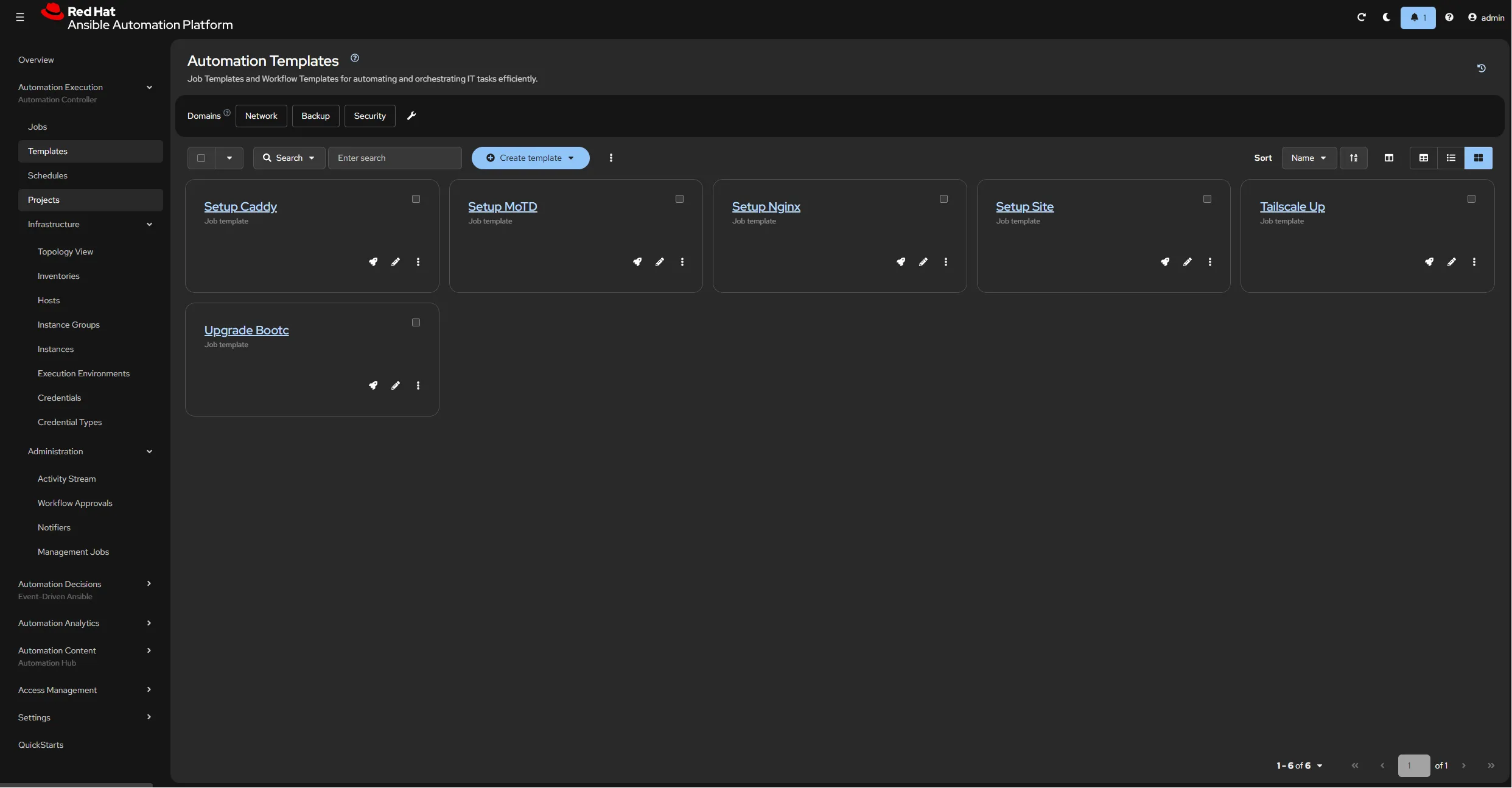
Ansible Automation Platform dashboard showing the playbooks I have setup
The beauty of Ansible is that you are also able to use it to configure your network. In my homelab I used it to configure my ubiquiti unifi controller to set up VLANs and firewall rules to segment my homelab, iot devices, and guest devices from each other. This allowed me to have my network configuration version controlled and no longer have to manually configure it through the web interface.
Once you have a repeatable operating system and a way to configure it, You need a way to provision the VMs. This is where Terraform/OpenTofu comes in.
What is Terraform / OpenTofu?
Terraform/OpenTofu helps you create and manage your infrastructure using code. I chose OpenTofu in my lab as it is a community driven fork of Terraform which is open source and it maintains compatibility with Terraform modules and providers. For proxmox, I used the bpg provider because it was being actively maintained.
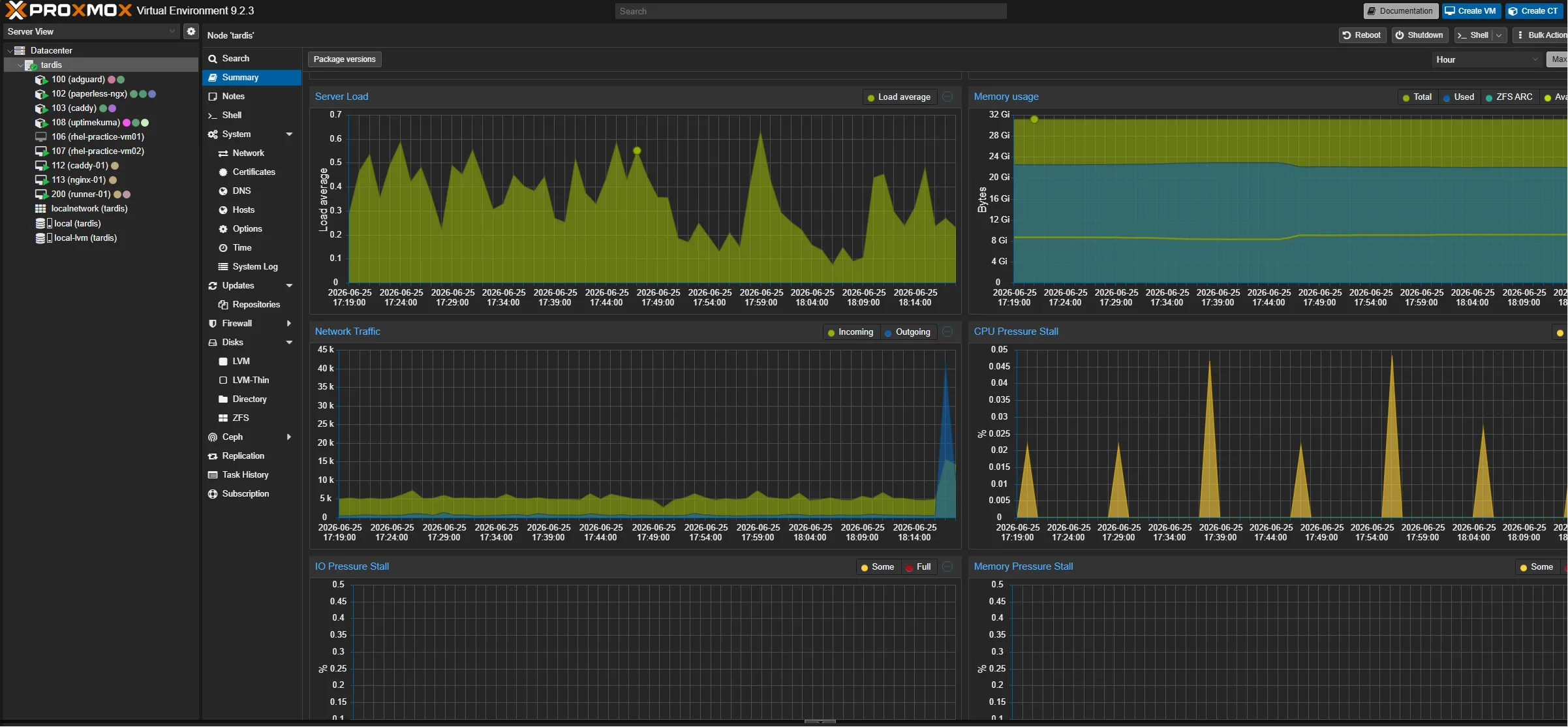
To avoid duplicating configurations across VMs, you can create a reusable VM module. Each virtual machine only specifies the values that differ, such as its name, CPU, memory, disk size, and IP address, while the module handles the shared configuration. By using this module, you can easily create new VMs that already have the configuration you want and are ready to be managed by Ansible.
VM module definition
resource "proxmox_virtual_environment_vm" "this" {
  name      = var.vm_name
  vm_id     = var.vm_id
  node_name = var.venv_node_name

  description = "Managed by Terraform"
  machine     = "q35"
  bios        = "ovmf"
  started     = true
  tags        = var.tags

  stop_on_destroy = true

  agent {
    enabled = true
  }

  cpu {
    cores = var.cores
    type  = "x86-64-v3"
  }

  memory {
    dedicated = var.memory
  }

  efi_disk {
    datastore_id = var.datastore_id
    type         = "4m"
  }

  disk {
    datastore_id = var.datastore_id
    file_id      = var.image_id
    interface    = "virtio0"
    iothread     = true
    discard      = "on"
    size         = var.disk_size
  }

  initialization {
    ip_config {
      ipv4 {
        address = "192.168.50.${var.ip_octet}/24"
        gateway = "192.168.50.1"
      }
    }
    dns {
      servers = ["192.168.50.213"]
    }
    user_account {
      username = "ansible"
      keys     = [file("~/.ssh/id_ed25519_ansible.pub")]
    }
  }

  network_device {
    bridge  = "vmbr0"
    vlan_id = var.vlan_id
  }
}
With this setup you can easily create new VMs by adding a new module block. This approach allows you to know that your entire lab is created with a predictable baseline. No longer do you have to sit through a fresh install of an OS and configure it. You can now create a new VM with a few lines.
Adding a new VM (Caddy Example)
locals {
  image_id = "local:import/geronimo-base.qcow2"
}

module "caddy" {
  source    = "./modules/vm/"
  vm_name   = "caddy-01"
  vm_id     = 112
  image_id  = local.image_id
  cores     = 2
  memory    = 2048
  disk_size = 20
  ip_octet  = 200
  tags      = ["bootc"]
}
Conclusion
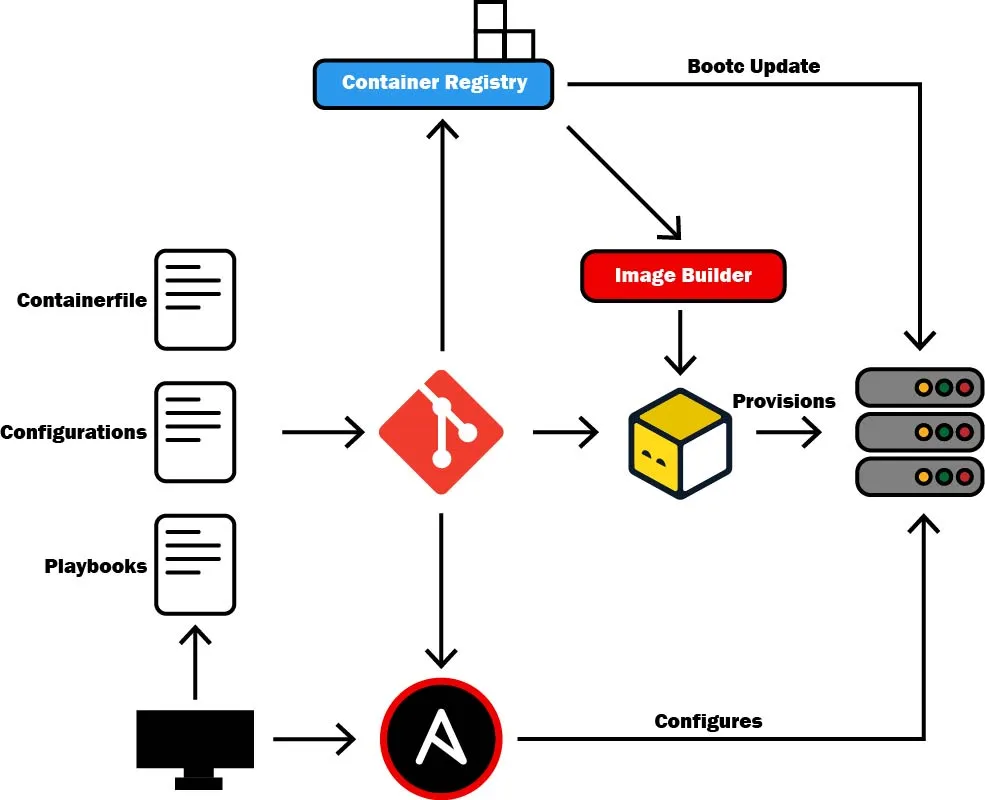
The BAT stack and how it all works together to manage my homelab
Getting all of this working together was satisfying, and cuts down a lot of the manual work used to maintain a homelab. Using this stack allows you to freely experiment and break things while also being reliable as you can revert to a previous working state from git.
To test my setup I wiped my entire homelab and network and it took 5 minutes to get everything up and running again. This was an improvement compared to the hours it used to take when I had to manually configure everything.
My CI/CD pipeline already handles building and pushing bootc image updates to the registry. The next step is to have pipelines handling deploying the playbooks and OpenTofu modules to my lab so that whatever is in git is what is running in my lab. Check out my GitHub repository to see how I have everything setup and how you can use it for your projects!
View on GitHub